How to Design Your Mobile App the Smart Way with Figma
by Sergiu Stancioiu, Front-end Developer
When people come up with an idea for a mobile app, their first instinct is often to jump straight into development. The excitement is palpable, with everyone eager to see the app working live and in users' hands as quickly as possible.
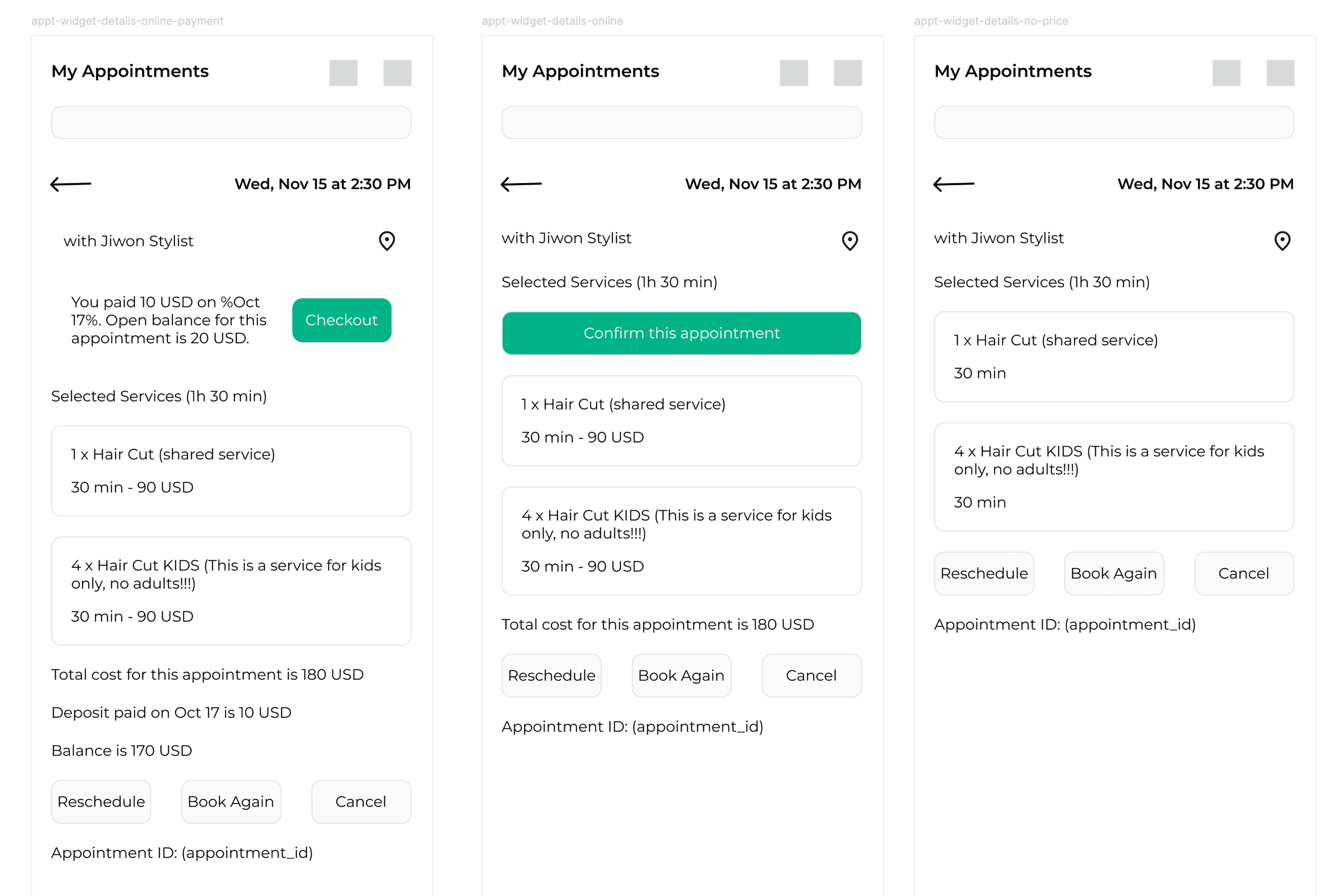
However, in software development, enthusiasm without proper planning can lead to wasted time, unnecessary costs, and endless revisions. Before you write a single line of code, it's crucial to plan and design your app effectively. This involves preparing a business plan, defining the user journey, and, most importantly, designing every screen in detail. This is where Figma becomes invaluable.
1. Start With a Business Plan
Every successful mobile app begins with a solid business plan.
Your plan should answer key questions like:
- What problem does the app solve?
- Who is the target audience?
- How will it make money (or sustain itself)?
- What is the long-term vision?
Writing down these answers early brings clarity. It separates personal excitement from practical goals. Many founders get emotionally attached to their initial ideas, and they want everything done at once. But stepping back and planning forces you to see what's essential now and what can wait for future updates.
Think of it as setting a direction before you start the engine.
2. From Planning to Design: Enter Figma
Once you have the concept clear, the next logical step is to visualize it — design the app screens.
Figma is one of the best tools for this phase (at least now in 2025). It’s an online, collaborative interface design and prototyping platform that allows multiple team members to work together in real time. Designers, product managers, and developers can all see changes instantly, comment, and make improvements.
The more detailed your design, the smoother your development process will be.
Every icon, color, and button placement communicates intent to your developers. When developers have a clear visual blueprint, they spend less time guessing and more time building. This means:
- Fewer revisions and misunderstandings
- Faster development cycles
- Lower costs overall
In other words, good design saves time, money, and nerves.
3. Why Designing in Detail Matters
Designing every screen in Figma doesn’t just make your app look good—it also reveals things you might have missed during brainstorming:
- You discover missing features or unclear flows that didn’t seem evident in the idea phase.
- You can “test” your app by clicking through prototypes before a single line of code is written.
- You can present the design to investors or partners and prove your concept visually.
This process of visual validation often saves teams from expensive reworks later in development.
4. Mobile App Development Becomes Easier (and Cheaper)
A complete design handoff from Figma to developers is straightforward. Developers receive:
- Layouts with exact spacing, colors, and text styles
- Code snippets and specifications
- Interactive prototypes that show how screens connect
This clarity speeds up coding and dramatically reduces back-and-forth communication.
Without it, developers must interpret unclear instructions — and every guess costs time and money.
5. Preparing for App Store Submission
Many people assume that after development, the job is done. In reality, launching an app involves more steps:
You must prepare screenshots, write descriptions, and comply with Apple App Store and Google Play Store requirements.
Having a clear Figma design helps even here. You can easily generate visuals and mockups for your store listing, ensuring your app looks professional and polished from day one.
6. A Great Design Helps Your App Shine
Once the app is live, users decide within seconds whether they like it.
A clean, intuitive UI/UX can make the difference between a successful launch and one that fails to attract users.
Apps designed with user experience in mind are easier to navigate, more enjoyable to use, and more likely to gain loyal followers.
In short, great design drives adoption.
7. The Cost of Skipping the Design Phase
Skipping detailed design might seem like a shortcut, but it often leads to:
- Inconsistent user interfaces
- Confused development teams
- Endless revisions and delays
- Higher long-term costs
Designing first might feel slower, but it’s actually the fastest way to reach a successful launch.
Conclusion
Figma is a design tool, but it’s also a bridge between your idea and your final product.
It helps you visualize, refine, and communicate your vision clearly before a single line of code is written.
For startups and established companies alike, investing time in Figma during the early stages of mobile app development is one of the smartest moves you can make.
At Web3Box, our team utilizes Figma for every mobile app and web project we develop—from initial sketches to clickable prototypes—ensuring our clients save time, reduce revisions, and create apps that users truly love.